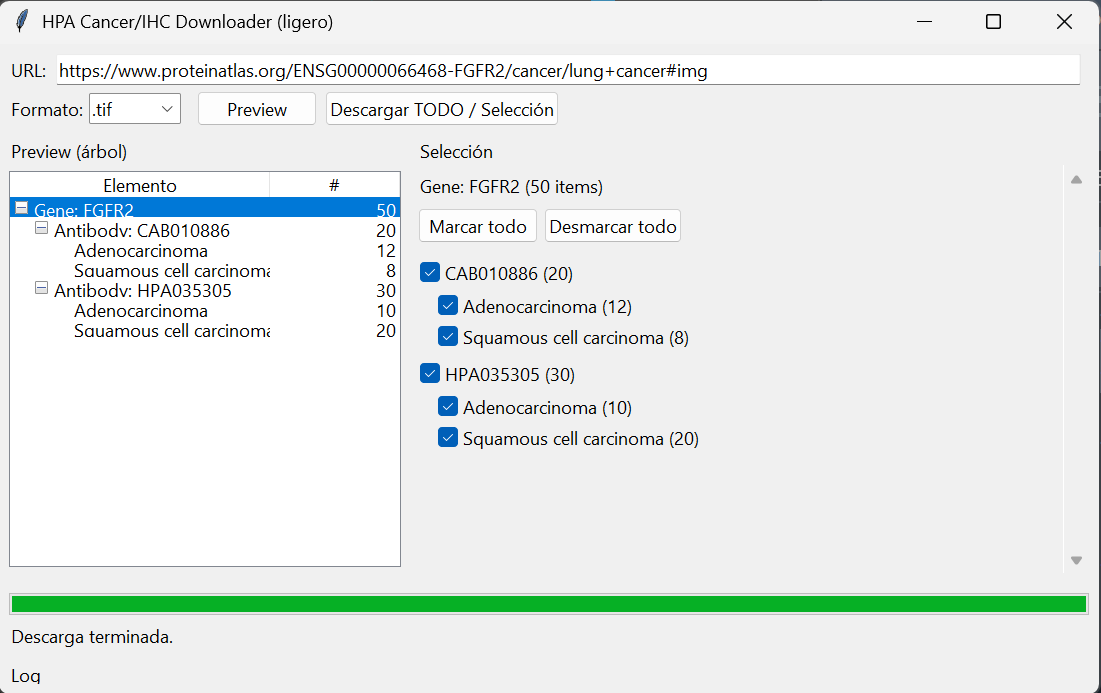
HPA Image Downloader
Windows executable that automatically downloads IHC histopathology images from a Human Protein Atlas cancer page, organizes them by gene/antibody/cancer subtype, and generates CSV summaries.
Requirements
- Windows computer
- Internet connection
ImageDownloaderHPA.exestored in an accessible folder
Output location
Everything is saved under your user Downloads folder, inside HPA Images.
How to get the correct URL
- Open Human Protein Atlas in your browser.
- Navigate to the target gene/cancer page.
- Make sure you are on the cancer tab where the image thumbnails are visible.
- Copy the full URL from the address bar.
Tip: If the tool says it cannot find antibody IDs, the URL is usually not pointing to the correct thumbnail section.
Run the executable
- Double click
ImageDownloaderHPA.exe. - Paste the URL in the console (right click → paste or Ctrl+V).
- Press Enter, then select 1 for
.jpgor 2 for.tif. - Wait until it finishes; it will report the output folder and ask you to press Enter to exit.
Folder structure
Downloads → HPA Images → <GENE> → <ANTIBODY_ID> → <CancerSubtype>
- Images renamed as
ID_<PatientID>_<n>.jpg/.tif - One CSV per cancer subtype folder
- One “global” CSV at antibody root
- One “global” CSV at gene root (all antibodies)
CSV fields (high level)
Each row corresponds to one image and includes (among others):
- Gene, AntibodyID, CancerFolder
- ImageName, ImageLink
- PatientID, Gender, Age
- CancerType, CancerCode
- LocationCodes (tissue codes)
Resolution + format note
Image resolution is 0.5 μm/pixel (same for JPG and TIFF). JPG files are compressed (smaller size), but compression can slightly affect intensities.
Common errors
- No antibody IDs found: verify the URL points to the cancer/IHC thumbnail section.
- No new folders in Downloads: check internet connection and URL correctness, and whether
HPA Imagesalready exists.
Screenshots
Visualization of the tool.