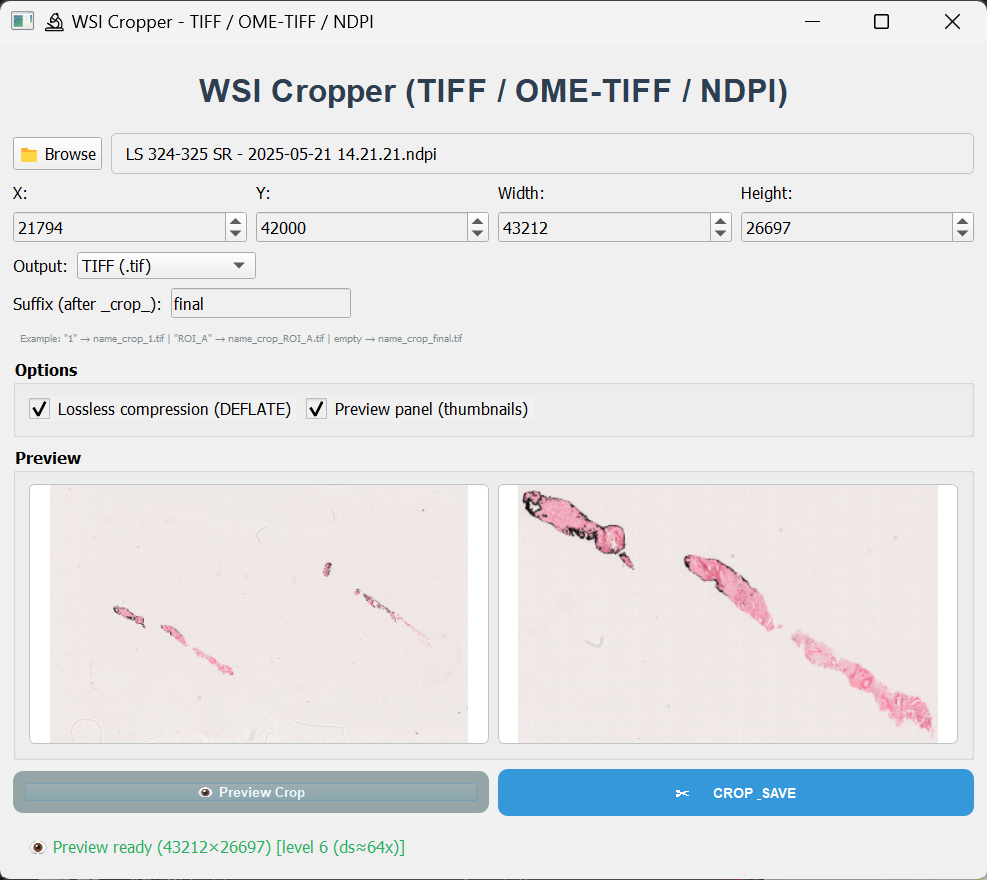
TiffCropper
Standalone application for cropping, tiling, and merging high-resolution whole-slide images and large microscopy files while preserving image metadata and spatial calibration.
Overview
TiffCropper is designed for digital pathology and microscopy workflows requiring precise ROI extraction, tile generation, and tile-based reconstruction from very large image files. Despite its name, the tool is not limited to standard TIFF images and supports common whole-slide image formats such as TIFF, OME-TIFF, and NDPI.
The application aims to preserve relevant metadata, including resolution information and physical pixel size when available, making the output suitable for downstream analysis in digital pathology, image processing, and computational workflows.
Key features
- Open large TIFF, OME-TIFF, and NDPI whole-slide images
- Coordinate-based ROI cropping using X, Y, Width, and Height
- Tile large images into user-defined rows and columns
- Merge previously generated tiles back into a reconstructed image
- Preserve spatial calibration and physical pixel size when available
- Export OME-TIFF with metadata preservation
- Optional lossless DEFLATE compression
- BigTIFF output support for large regions
- Pyramid-aware preview for efficient navigation of large images
- Standalone executable; no Python installation required
Quick start
- Open the application and select a supported image file.
- Use the preview to inspect the image and define the target region.
- Enter ROI coordinates: X, Y, Width, and Height.
- Select the desired output mode: crop, tile, or merge.
- Choose the output format and compression options when available.
- Click the corresponding action button to generate the output.
Cropped outputs and generated tiles are saved with structured filenames to make downstream organization and reconstruction easier.
Typical use cases
- Extract high-resolution regions of interest from whole-slide images
- Generate tiles for deep learning or image analysis workflows
- Split very large images into smaller manageable files
- Reconstruct tiled regions after external processing
- Preserve microscopy calibration metadata for quantitative analysis
Coordinate system
Images are treated as pixel matrices. X corresponds to the horizontal coordinate or column index from left to right, while Y corresponds to the vertical coordinate or row index from top to bottom. Width and Height define the ROI size in pixels.
Output formats
- TIFF: standard output for cropped regions and tiles
- OME-TIFF: recommended when physical calibration metadata should be preserved
- BigTIFF: used when output files exceed standard TIFF size limits
Troubleshooting
- No file selected: verify that the input path is valid and accessible.
- Cannot read dimensions: confirm that the file is a valid TIFF, OME-TIFF, or NDPI image.
- Access denied: move the source image to a writable folder or check file permissions.
- Large output fails: enable BigTIFF output or reduce the ROI/tile size.
- Linux dependency error: use the official release package or rebuild the app with bundled image codecs.
Why the name TiffCropper?
TiffCropper was originally developed for cropping large TIFF microscopy images. The current version has expanded beyond simple TIFF cropping and now supports whole-slide image workflows including ROI extraction, tiling, merging, OME-TIFF export, and NDPI input support. The original name is maintained for continuity, while the tool now functions as a broader WSI crop, tile, and merge utility.
Screenshots
Visualization of the TiffCropper interface.